A smart operating system for your entire company.

We build a working digital copy of how your business runs, then use it to take repetitive work off your team, with a person accountable for every decision that matters and a record of every action taken.

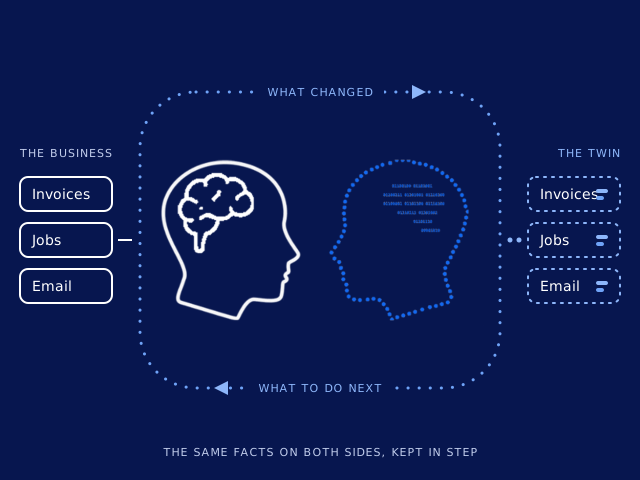
Illustration: the business and its digital twin update each other in a continuous loop. On the left, the business: invoices, jobs and email as solid boxes. On the right, the twin: the same invoices, jobs and email as records with a history, drawn dotted. Between them, the mark: a solid human head beside its dotted digital twin. A loop of dots carries what changed from the business to the twin, and what to do next from the twin back to the business.

The digital twin

What is a digital twin of a business?

A digital twin is a live, structured copy of how your business actually runs. Its customers, money, work, people and documents are held as governed records with a complete history, precise enough for software to act on and plain enough for you to check.

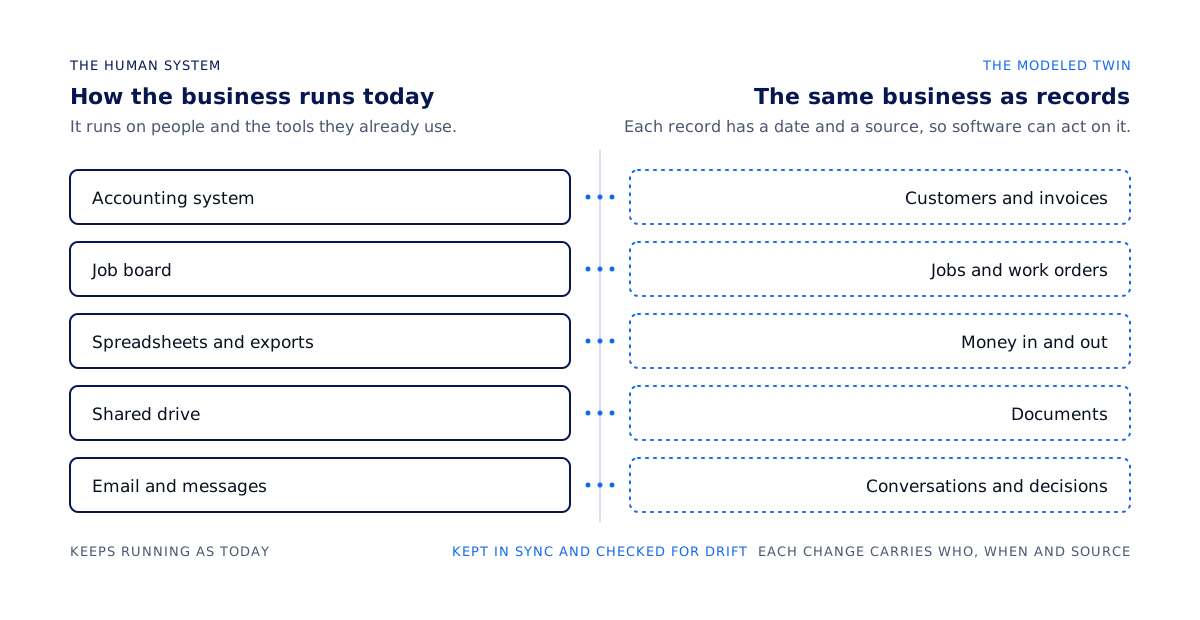
Diagram: the twin runs alongside the business. On the left, the human system: accounting system, job board, spreadsheets and exports, shared drive, email and messages, all of which keep running. On the right, the modeled twin holds the same business as records: customers and invoices, jobs and work orders, money in and out, documents, conversations and decisions. Between them the twin mirrors, reconciles and flags drift, and every change carries who, when and source.
The human system on the left keeps running. The twin on the right holds the same facts as records.

The human system

How the business runs today

Most of how a business runs today lives in people's heads and in the tools they use: an accounting system, a job board, a shared drive, a few spreadsheets, and a great deal of email. It works because the people who run it know where everything is.

The modeled twin

The same business as records you can inspect

Each customer, invoice, job, document and conversation becomes a typed record, and each change carries who made it, when, and from which source. The twin runs alongside your current systems and updates as they change, so it stays a live model.

Why the pairing matters

Automation needs facts it can act on

Automation built on a vague picture of the business fails in ways nobody notices until the damage is done. Built on the twin, it acts on records with a name, a date and a source, and when a decision needs a person, it puts that decision in front of the right one with the relevant facts attached.

Why we build it

A business that costs less to run

Most companies we talk to already have enough software. What they want is for the work they already do to take fewer people and fewer subscriptions. The twin gets there without replacing anything on day one.

What changes

Repetitive work moves to software

Data entry, chasing, reconciling and re-typing the same facts into three systems are the first things to go. A script handles whatever a script can handle. When a soft judgment is needed, an AI model makes that one call and nothing more, and people are left with the work that actually needs them.

What changes

Decisions come to you with the facts attached

Anything irreversible, external or regulated stops for a person's approval, with the facts assembled and the options laid out. A sample of approved actions is reviewed afterwards, which keeps the approvals honest.

What changes

Fewer tools and fewer seats

As the twin proves it can carry a process, the tools that only existed to carry it can go. Nothing is switched off until the record shows the twin has been doing the job correctly.

How it works

How does an engagement work?

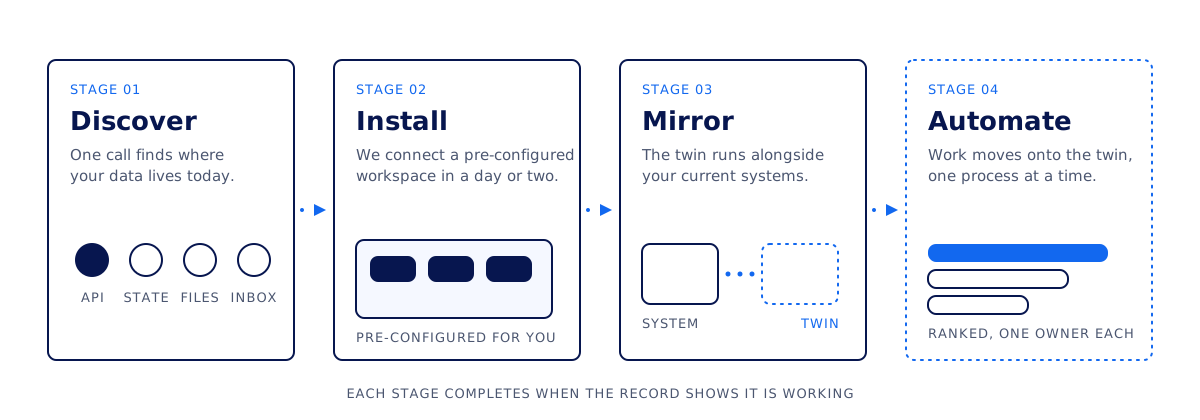
An engagement has four stages: discover, install, mirror and automate. We move to the next one when the record shows the current one is working, so the timing depends on your business.

Diagram of the four stages in sequence. Stage 1, Discover: one call to find where your data lives today, whether an API, current state only, files, or an inbox. Stage 2, Install: a pre-configured workspace with modules, keys and connections, stood up in a day or two. Stage 3, Mirror: the twin runs alongside your current systems. Stage 4, Automate: work moves onto the twin one process at a time, ranked by value with one owner each. A stage is finished when the record shows it working.
The four stages from left to right. The fourth is drawn dotted because that work is done by the twin.
STAGE 01

Discover

Find where your data lives.

Details: Discover

It takes one call. We work out how your operation is recorded today, whether in systems with proper histories, systems that hold only the current state, periodic exports and spreadsheets, or mostly inboxes and messages. Any of those is a workable starting point, and which one it is decides how much hands-on work the twin will need.

STAGE 02

Install

Connect your tools to a prepared workspace.

Details: Install

You do not start from a blank workspace. We bring one already configured for your kind of business, with the modules, the connections to your existing tools, and the keys and permissions in place, and we stand it up in a day or two.

STAGE 03

Mirror

Run alongside your current systems.

Details: Mirror

Your current systems keep running while the twin mirrors them, reconciles against them and flags anything that drifts. Handing authority from an old system to the twin is a deliberate decision made one table at a time, and we do not rip anything out.

STAGE 04

Automate

Move one process at a time.

Details: Automate

Automations are added in order of value, each with a named person accountable for it. Because the twin records how the business actually behaves, the next process to automate is chosen from that record.

Safe, fast and accountable

What keeps the twin safe, fast and accountable

Follow the flow, check the rules, and see who stays in control.

Why it is safe

  1. Your systemsRead onlyRead data
  2. Checked workRules checkedWhen needed
  3. Your decisionApprove firstThen write
  4. Saved resultWho + when
Read first. Check each change. Keep a record.
Read details: Why it is safe
  • Your systems. The twin reads from your existing systems before any change is proposed.
  • Checked work. Each write runs through a checked workflow. Apps, workflows and integrations meet the same access rules.
  • Your decision. Irreversible, external or regulated actions stop for a named person to approve.
  • Saved result. Each write leaves a record of who acted, when, from which source and why. History is append-only.

Connections

  • Your systems → Checked work: Read data.
  • Checked work → Your decision: When needed.
  • Your decision → Saved result: Then write.

Why it is fast

  1. New requestStart hereRun steps
  2. Repeatable workSame stepsDecide
  3. One decisionYou approveRecord
  4. Saved resultNo retyping
One workflow replaces repeated handoffs.
Read details: Why it is fast
  • New request. A routine request enters one workflow rather than waiting in separate handoff queues.
  • Repeatable work. Software carries the repeatable steps in a checked workflow.
  • One decision. A person sees the decision that matters, with the relevant facts attached.
  • Saved result. The result is recorded, so it does not have to be re-entered at the next handoff. This is a process illustration, not a speed benchmark.

Connections

  • New request → Repeatable work: Run steps.
  • Repeatable work → One decision: Decide.
  • One decision → Saved result: Record.

What we guarantee

  • Full historyNo silent edits
  • Named ownerAccountable
  • Your systemsStay yours
  • Results feeMeasured gain
Visible history. Clear ownership. Measured results.
Read details: What we guarantee
  • Full history. Keep a complete, append-only history. Changes identify who acted, when, from which source and why.
  • Named owner. A named person is accountable for each decision that matters.
  • Your systems. Your systems of record keep running alongside the twin.
  • Results fee. We charge a share of improvement against an agreed baseline. If the number does not move, we do not get paid.

Your data and access

  • Your systemsKeep running
  • Your workspaceHolds records
  • Your portalFiles + messages
  • Scoped keysYou can revoke
Your records, behind explicit access rules.
Read details: Your data and access
  • Your systems. Your systems of record stay yours and continue to run.
  • Your workspace. The twin stores its records in your workspace. Access rules are compiled into the database.
  • Your portal. Use the private portal for communication, files, work, metrics and terms. Uploads land in your workspace with a receipt.
  • Scoped keys. The team reaches your workspace through scoped keys that you can revoke from the portal.

Connections

  • Your systems → Your workspace: Mirrors records into.
  • Your portal → Your workspace: Uploads with receipts to.
  • Scoped keys → Your workspace: Limits team access to.
Download diagram data

Nodes and connections (JSON) · Data schema · Linked data (JSON-LD)

The platform underneath

Built on a platform designed for governed operations

The twin runs on an application platform built for this kind of work. A company's operations are modelled in it as services, workflows and governed records, which is what makes the work automatable and auditable.

Services and apps

Each part of the business is one service

Customers and relationships, the financial ledger, money movement, people, sales, operations, assets, procurement, communications and documents are each a separate service, and you install only the ones you need. Apps are the screens your team uses on top of them, and you can build more of them yourself.

Workflows and records

Checked before they run

Automations are built from a small, closed set of step types and validated before they are allowed to run. Who may see which record is written once and compiled into the database itself, so a wrong query cannot leak across a boundary.

Our part

We do the setup that stalls most businesses

We connect your tools, obtain the keys, decide what is an app and what is a service, migrate the data safely and keep each client's stack updated. That is the part of the job we have made repeatable, and it is the part that stalls most businesses. You keep the ability to build on and change anything we hand you. Developers can read how a workspace is structured on the For developers page.


How we charge

How do we charge?

We charge a share of the improvement the twin produces, measured against a baseline we agree with you before anything is installed. If the number does not move, we do not get paid.

Baseline

Agreed before install

Before we begin, we record what the operation costs and how long its recurring work takes today. That baseline is written down in your portal and does not move. The measures are agreed with you before the engagement begins.

Fee

A share of what improves

As the twin takes on work, we measure the difference against the baseline and charge a share of it. Your proposal sets out the share, measurement schedule and payment terms.

Everything else

The terms are written down

Compensation terms are held in your portal as structured fields (rate, cadence, currency and any contingencies) with an append-only history, so both sides can see what was agreed and when it changed. The duration, notice period and payment schedule are set out in your proposal.

The full mechanism, with what happens if nothing improves and two illustrations of the arithmetic, is on the pricing page.

Clients work with us through a private portal. It holds secure communication, document upload and a personal chat agent that organizes your requests and routes them to us, and the weekly newsletter is subscribed from inside it.

Sign in to your portal

Questions

Questions we hear first

These are short answers based on how we actually work. A first call covers whatever is missing here.

Do we have to replace the systems we use today?

No, your current systems keep running. The twin mirrors them, reconciles against them and flags anything that drifts. Handing authority from an old system to the twin is a deliberate decision made one table at a time, and nothing is switched off until the record shows the twin has been doing that job correctly.

How long does it take to get a twin running?

One discovery call establishes where your data lives. We then arrive with a workspace pre-configured for your kind of business, with the modules, the connections to your existing tools and the keys already in place, and stand it up in a day or two. Automations are added afterwards, one process at a time.

What does it cost?

We charge a share of the improvement the twin produces, measured against a baseline we agree with you before anything is installed. If the number does not move, we do not get paid. The exact share, measurement cadence and settlement terms are agreed in your proposal. Contact us to discuss the terms for your business.

What does software decide on its own?

A script does whatever a script can do. When a soft judgment is needed, an AI model makes that one call and nothing more. Anything irreversible, external or regulated stops for a person's approval with the facts assembled, and a sample of approved actions is reviewed afterwards.

Who can see our records?

Each record carries who changed it, when, and from which source. Who may see which record is written once and compiled into the database itself, so a wrong query cannot leak across a boundary. You keep the ability to inspect, build on and change anything we hand you.

What is in the client portal?

The portal is the private place for everything between you and us. It holds secure communication in one thread, document upload with a receipt for each file, a personal chat agent that organizes your requests and routes them to us, the work in progress and its measured results, the current scope and compensation terms with each revision kept, and the weekly newsletter, which you subscribe to from inside the portal.

How do you handle our data?

Your records stay in your own workspace, where each change carries who made it, when, and from which source, and where access rules are compiled into the database itself. Documents you upload through the portal land in that workspace with a receipt for each. Ask us about hosting, security, retention, deletion and model data use before sharing business records.

What if our business runs mostly on email?

That is a workable starting point. A business whose record lives mostly in inboxes and messages needs more hands-on work from us to build the twin and keep it current, and the discovery call is where we work out how much. You will know the answer before anything is installed.

Start a conversation

Tell us how your business runs

We will tell you what a twin of it would change. A first call is enough to establish where your data lives, what a baseline would measure, and whether an engagement makes sense. There is nothing to sign up for before that conversation.